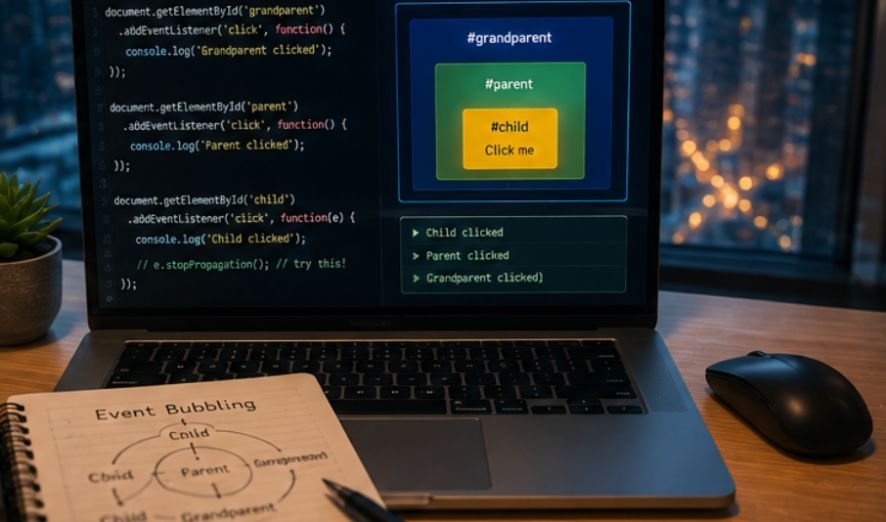
Building interactive web apps often leads us to weird bugs where clicking one button triggers three actions at once. Learning what is event bubbling JavaScript helps us master how user clicks travel through our HTML elements seamlessly.
Understanding what is event bubbling JavaScript keeps you sane when building complex user interfaces. Without this knowledge, your page clicks trigger chaotic chain reactions, modal popups close unexpectedly, and navigation menus break. Master this concept to tame event chaos easily.
Key Takeaways for Web Developers
- Events bubble upward from the clicked child element all the way up to the root document node in the HTML DOM tree.
- Browsers turn on event bubbling by default whenever we register standard event listeners on page elements.
- Event delegation leverages bubbling so a single parent container can manage interactions for dozens of dynamic child elements.
- Calling stopPropagation halts upward event travel but we should use it carefully to prevent breaking outer global listeners.
- Mastering event bubbling improves app performance, lowers memory consumption, and keeps our code clean.
How Events Travel Up the DOM Tree
Understanding how browser events travel through nested DOM structures is essential for writing clean event handlers.
The Journey from Target to Root
Every time a user clicks a button inside a nested div, the browser triggers an event on that specific element. Instead of stopping right there, the event bounces up to the parent element, then to the parent’s parent, and continues climbing up to the document object.
Think of it like dropping a pebble into a small bucket inside a larger tub; the initial splash spreads outward to affect every outer layer.
Why Web Browsers Work This Way
Engineers who built early web browsers needed a way for parent elements to know when something inside them changed. By letting events flow upward, outer elements can naturally respond to user inputs without requiring us to attach listeners to every single child tag.
You can explore the official MDN Web Docs on Event Propagation to read how browser standards evolved over time.
The Difference Between Target and Current Target
JavaScript provides two distinct properties inside the event object that help us track this movement. The event.target property points directly to the exact element that received the initial click, such as a child span tag. Meanwhile, event.currentTarget refers to the element currently handling the event as it bubbles upward through the tree.
Comparing Event Propagation Phases
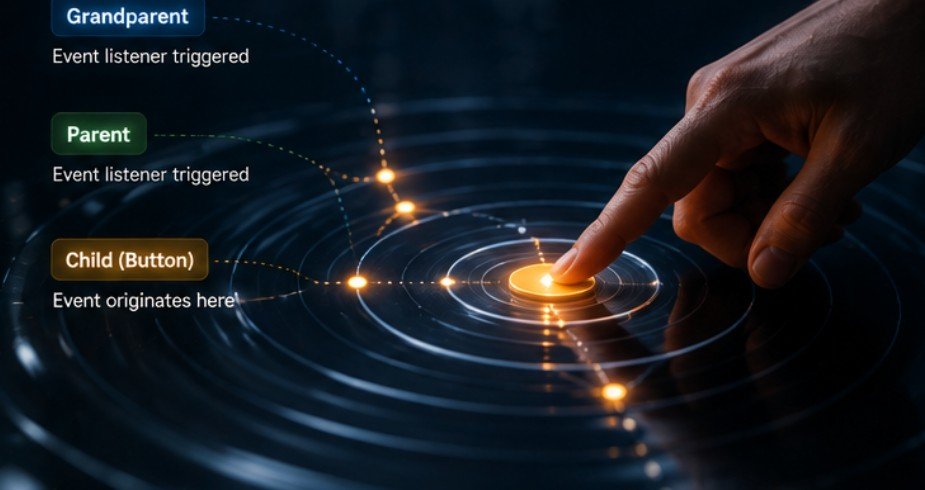
Browser event propagation happens in distinct stages that dictate when individual event listeners execute.
The Downward Capturing Phase
Before an event bubbles up, it actually travels down from the top document root down to the target element. This initial downward trip is called the capturing or trickling phase. Most web developers rarely interact with this phase, but it allows outer elements to intercept user actions before they reach the inner target.
The Upward Event Bubbling Phase
Once the event hits the deepest target element, it enters the official bubbling phase. During this stage, event listeners attached to parent containers execute in sequential order from inside out. To read more about how standard specs define this flow, visit the W3C DOM Event Specification page.
Choosing Between Capturing and Bubbling
We can choose which phase to listen to when adding event listeners using addEventListener in JavaScript. Passing true as the third argument listens during capturing, while leaving it empty or passing false defaults to bubbling. Almost all modern frontend applications rely almost exclusively on the default bubbling phase.
Step-by-Step Guide to Event Bubbling JavaScript
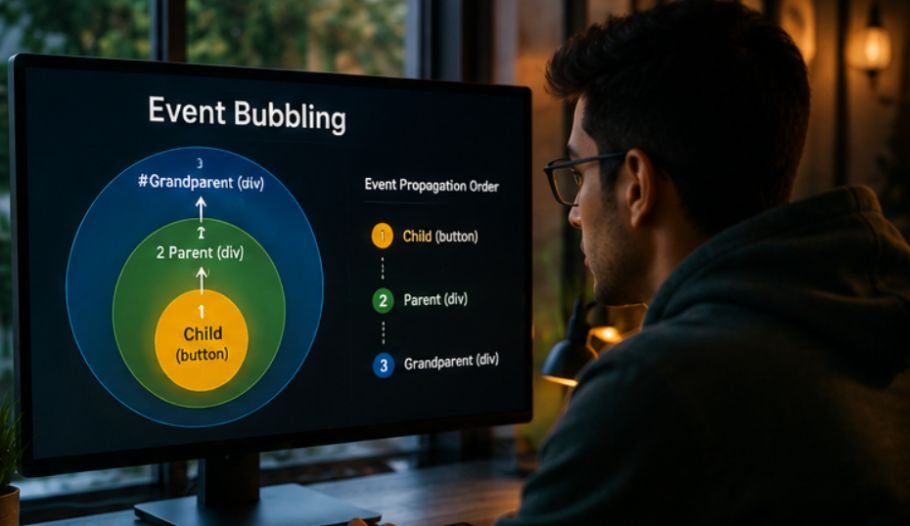
Implementing what is event bubbling JavaScript in production apps helps streamline code and boosts site rendering performance.
Set Up a Parent Delegate
First, we attach a single click listener to an overarching parent element like an unordered list container rather than attaching individual listeners to hundreds of list items. This keeps our memory footprint small and makes DOM updates significantly faster.
Inspect the Clicked Target
Next, inside our event listener callback function, we inspect event.target to see which specific child element triggered the user interaction. We can check class names, attributes, or tag names to verify if the clicked node is the exact button or link we care about.
Execute Specific Actions Safely
Finally, we run our business logic based on that target check while allowing unrelated clicks on the parent background to pass by harmlessly. Check out JavaScript.info’s Event Delegation Guide for deeper real-world code examples using this pattern.
Mastering Event Delegation and Performance
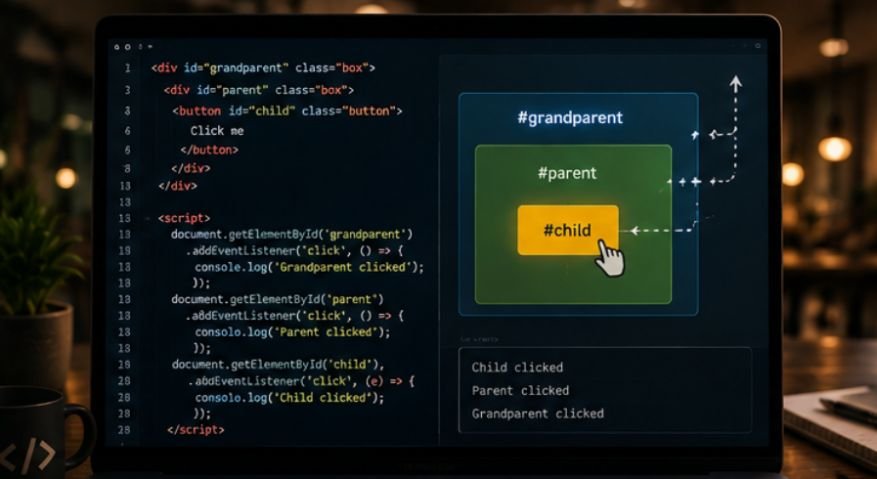
Leveraging event delegation unlocks massive performance gains when managing dynamic DOM nodes.
Boosting Memory Efficiency
Creating thousands of event listeners inside a complex web application development consumes memory and can slow down lower-end mobile devices. By using event bubbling to consolidate listeners onto a shared parent, we reduce garbage collection overhead and keep our applications snappy.
Performance also depends on where and how application content is rendered. Understanding client side versus server side rendering helps developers decide whether interactive JavaScript should handle most page updates in the browser or whether initial content should be generated on the server for faster delivery and improved efficiency.
Handling Dynamically Added UI Elements
When we add new items to a dynamic todo list or endless feed, traditional listeners require us to bind new event handlers manually. Event bubbling solves this automatically because new child items seamlessly bubble their events up to the existing parent listener without extra code.
Avoiding Overuse of Stop Propagation
Calling event.stopPropagation() stops the event from reaching parent containers, which can fix local UI issues like unwanted modal closes. However, overusing it breaks global analytics tracking, dropdown auto-closing scripts, and top-level navigation listeners that rely on observing every page click.
This kind of ripple effect is one reason why developers are learning systems thinking instead of more frameworks. Rather than treating each event handler as an isolated piece of code, developers can examine how local changes influence analytics, navigation, shared components, and other connected parts of the application.
Frequently Asked Questions
1. How can I stop event bubbling in JavaScript?
You can stop event bubbling by calling the event.stopPropagation() method inside your event handler function. This immediately halts the event journey and prevents parent DOM elements from detecting or reacting to that click action.
2. What is the difference between event bubbling and event capturing in JavaScript?
Event capturing moves downward from the root document object all the way to the target element. Event bubbling travels in the opposite direction, moving upward from the clicked target element back up through ancestors to the root.
3. Is event bubbling default?
Yes, event bubbling is the default behavior in modern web browsers. Standard addEventListener calls automatically listen during this upward bubbling phase unless you explicitly enable the downward capturing phase by passing true as a configuration argument.
4. How does event bubbling improve performance?
Event bubbling enables event delegation, allowing a single parent listener to manage interactions for hundreds of child elements efficiently. This drastically reduces browser memory consumption, lowers garbage collection overhead, and simplifies handling dynamic UI updates.
Bouncing to the Top with Event Bubbling
Mastering what is event bubbling JavaScript gives us full control over browser behavior and interactive web applications. By understanding how events travel upward through DOM elements, we can write cleaner code, avoid tricky UI bugs, and build high-performance web applications using event delegation.
Leave a Reply